
Check User Permissions
One of the most common reasons for record visibility issues is insufficient user permissions.
- Go to Settings :
-
- Navigate to Settings > Users & Teams.
- Review Permissions:
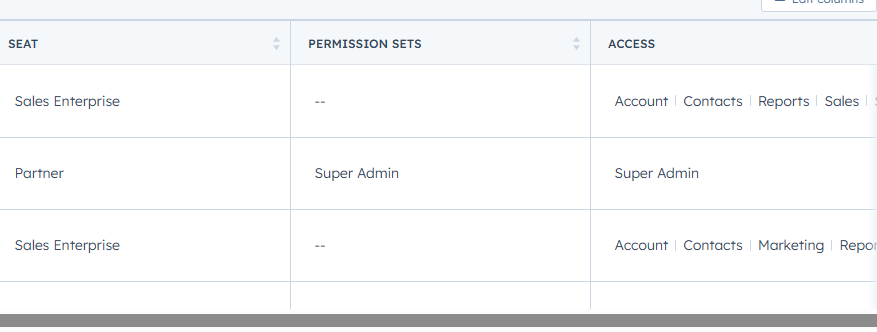
- Ensure the user has permission to view the record types you're having issues with (Contacts, Companies, Deals, Tickets, etc.).
- Check Record-level Permissions and make sure users have access to the appropriate pipelines, folders, or teams.
- In the case of Team Access: Ensure the user is part of the correct team and that the record is shared with that team.
Check Record Ownership
In HubSpot, records can be owned by specific users, and access to those records can be restricted based on ownership.
- Check Record Ownership:
- Go to the Record (e.g., Contact, Deal) and check the Owner field.
- If you're not the record owner, the system may restrict visibility, depending on your permissions and the settings configured by your account admin.
- Reassign Ownership (if needed):
- To reassign a record, click on the Owner field and select a new user to assign the record.
Review Property-Level Permissions
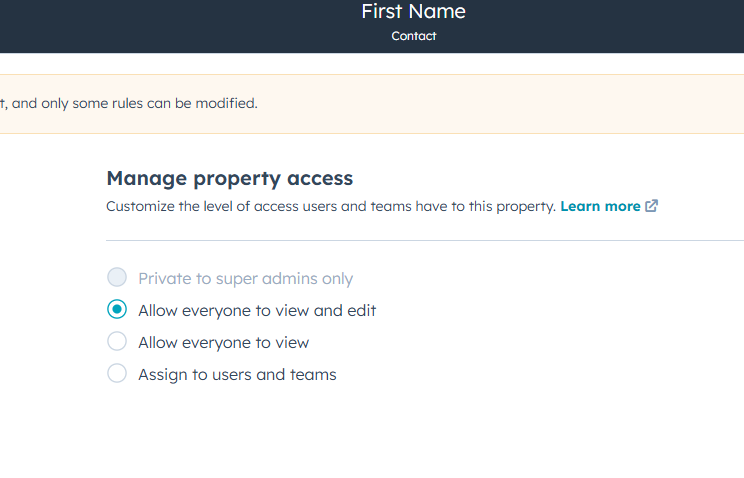
Some custom properties may have visibility restrictions, depending on how they were set up.
-
-
Go to Settings:
-
Navigate to Settings > Properties.
-
-
Check Property Visibility:
-
Review the Field-level Permissions for custom properties.
-
Make sure that the properties are visible to the relevant users based on their roles.
-
-
Check View Filters
Sometimes, filters can prevent you from seeing certain records.
- Go to the Records View (e.g., Contacts, Deals, Tickets).
- Check Active Filters:
- Ensure there are no filters applied that are hiding the records you need. Clear any unnecessary filters.
- Click Filter at the top of the records list and make sure it is set to show All records or adjust the filters to include the records you're missing.
Review Data Privacy & GDPR Settings
If your organization has implemented GDPR or other data privacy rules, visibility restrictions may be based on privacy preferences or legal requirements.
- Review GDPR Settings:
- Go to Settings > Privacy & Consent.
- Ensure that records are not being hidden due to a contact's GDPR consent settings or privacy preferences.
Check for Record Archival or Deletion
HubSpot may archive or delete records based on certain triggers or workflows.
- Search for Archived Records:
- In the Contacts, Deals, or Tickets section, check the Archived view to see if records are archived.
- Review Deletion Logs:
- If records were deleted, you can review the Audit Log (available to admin users) to see if any deletions occurred.
Verify Record Sharing Settings
In some cases, specific records may not be shared across the organization, or they may be restricted to specific users or teams.
- Review Record Sharing Settings:
- For Sales Pro/Enterprise users, check the Team Access and Shared Access settings on the record itself to ensure it is shared with the appropriate users or teams.
-
- Ensure that the Record Visibility settings are correctly configured to allow other users to access the record.
Test in an Incognito Window or Clear Browser Cache
Sometimes browser cache or settings can cause issues with record visibility.
- Clear Browser Cache:
- Clear your browser cache and cookies to ensure no old settings are interfering.
- Test in Incognito Mode:
-
- Open your browser in Incognito/Private Mode and log in to HubSpot. This can help rule out issues caused by extensions or cache.
Still Need Help?
If you’ve followed the steps above and are still having issues with record visibility:
- Contact HubSpot Support:
-
- Reach out to HubSpot Support with detailed information about the issue and the steps you've already taken.
- Provide Relevant Details:
-
- Include screenshots of the records you can’t see, the filters and permissions that are applied, and any other relevant details.