
Enter a Task Title
A task cannot be created without a title.
- Make sure the Task Title field is filled in.
- If left blank, the "Create Task" button will be greyed out.
Check User Permissions
If you're unable to create or assign tasks, it might be due to insufficient user permissions.
To check:
- Go to Settings > Users & Teams.
- Select your user account.
- Confirm that you have permissions for:
- Sales tools
- CRM (Contacts, Deals, Tasks)
- Task assignment
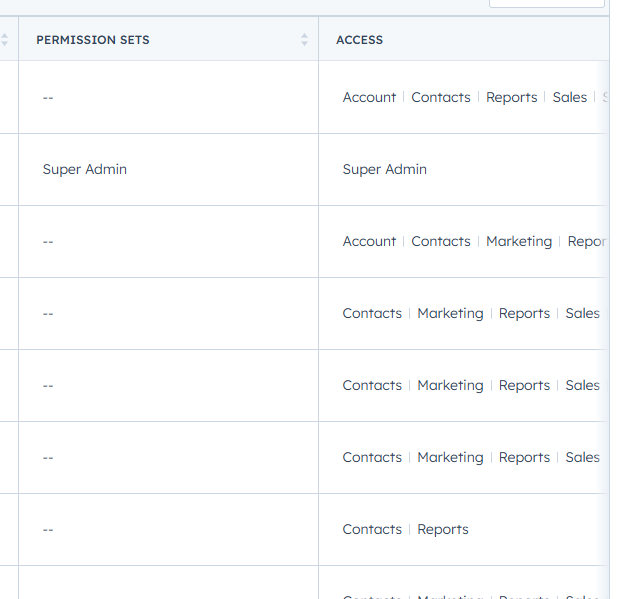
Review Workflow Task Settings
If tasks are not being created through a workflow:
- Go to Automation > Workflows.
- Open the workflow where the task should be created.
- Check:
- Is the "Create task" action set up correctly?
- Is there a valid assignee?
- Is the contact properly enrolled in the workflow?
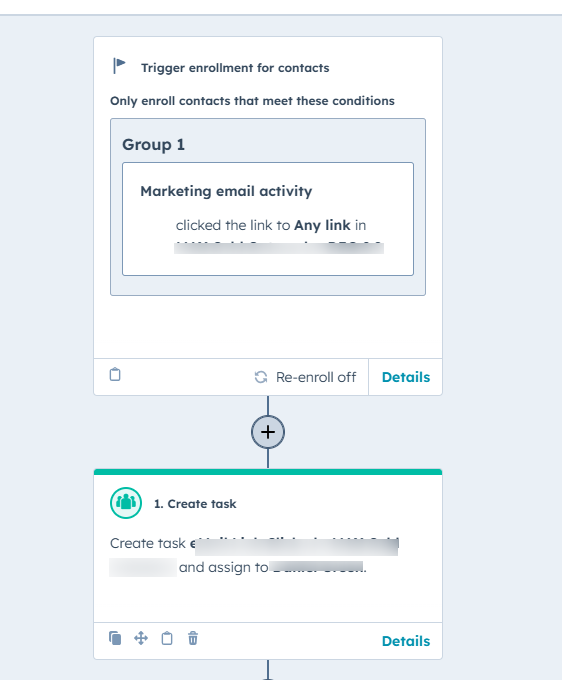
Clear Browser Cache and Try Incognito Mode
Sometimes browser cache or extensions can block features.
Try this:
- Clear your browser’s cache and cookies.
- Use incognito/private mode to rule out any extension conflicts.
- Ensure you're using a supported browser (like Chrome or Firefox).
Ensure JavaScript Is Enabled
HubSpot relies on JavaScript to create and assign tasks.
- Make sure JavaScript is enabled in your browser.
- Disable browser extensions that may block scripts (like ad blockers or script blockers).
Adjust Task Filters
If you're creating tasks but not seeing them:
- Go to Sales > Tasks.
- Click the Filters menu.
- Clear or adjust filters to show:
- All task types
- All dates
- All users
Confirm Task Associations
Tasks need to be linked to records (e.g. contacts, companies, deals).
- When creating a task, double-check that it's associated with the correct record.
- You can add associations manually if they’re missing.
Check Notifications (for Assigned Tasks)
If tasks are created but not seen by the assignee:
- Go to Settings > Notifications.
- Ensure task assignment notifications are enabled for email and in-app alerts.
Still Not Working?
If you’ve tried all the above and tasks still aren't working:
- Try logging out and back into HubSpot.
- Contact HubSpot Support with the following:
- Screenshot of the issue
- Details of the record or workflow
- Browser and device info