
Common Causes & Fixes
Enrollment Triggers Not Met
Issue: No contacts or records are entering the workflow.
What to Check:
- Go to the workflow editor
- Click Enrollment triggers
- Verify that the filters and conditions are correct and match actual records
Fix: Use a test contact or record that meets the criteria to validate your setup. Update your triggers if needed.
Re-enrollment Not Enabled
Issue: A contact went through the workflow once but isn’t re-entering.
What to Check:
- In the enrollment trigger section, scroll to Re-enrollment settings
Fix: Enable Re-enrollment and choose which criteria should allow repeat entry.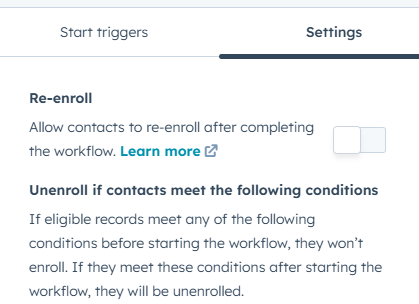
Workflow Is Inactive or in Draft Mode
Issue: Workflow is built but not running.
What to Check:
- At the top of the workflow, confirm the status is Active
- If it says “Needs review,” fix any errors first
Fix: Click Review and publish or Turn on the workflow.
Email Not Sending
Issue: The workflow is running, but emails aren’t being delivered.
What to Check:
- Is the email published and set for automation use?
- Has the contact opted into the email type?
- Has the contact unsubscribed from all email?
Fix: Ensure your email settings allow automation and that recipients meet the delivery requirements. Use transactional emails for non-marketing communication.
Stuck in Workflow Due to Logic or Branching
Issue: Contact enters the workflow but stops partway through.
What to Check:
- Inspect If/Then branches, goals, and delays
- View the workflow history for that record
Fix: Adjust your branching logic or goal settings. Remove unnecessary steps that may block progress.
Workflow Already Completed for the Record
Issue: Record doesn’t re-trigger because it's already finished the workflow.
Fix: Enable Re-enrollment if you want the same record to enter again based on specific conditions.
How to Test Your Workflow
- Open the workflow and click Test (top right)
- Choose a sample record
- Review each step to see how it will behave
- Use the “History” tab to trace actual enrollments and issues
Still Stuck?
If none of the above fixes your issue:
- Check the History tab in the workflow for error details
- Make sure the correct object type (contact, deal, ticket, etc.) is selected
- Use HubSpot’s Support Chat if your plan includes it