
Common Symptoms
-
A specific deal or ticket pipeline is missing from the dropdown
-
You see only one pipeline, even though others exist
-
Users on your team report that they can’t see shared pipelines
-
The pipeline name isn’t listed when creating a new record
-
Pipelines show in settings but not on the board view
Step-by-Step Troubleshooting Guide
Check User Permissions
Pipelines can be restricted by user permissions.
To verify:
-
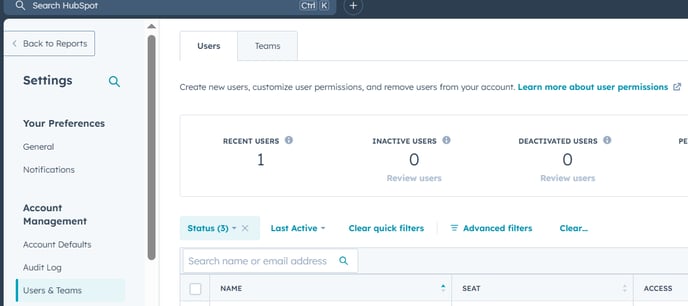
Go to Settings > Users & Teams
-
Select the user who can’t see the pipeline
-
Under CRM > Deals or Tickets, check:
-
View access is set to “Everything” or includes the pipeline
-
Edit access is not restricted to owned-only pipelines
-
Admins can view and manage all pipelines. Regular users may need specific access granted.
Confirm the Pipeline Exists
Sometimes the pipeline was deleted or created under the wrong object (e.g., ticket vs. deal).
To check:
-
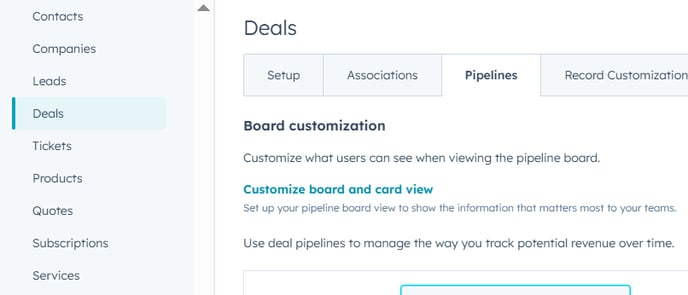
Go to Settings > Objects > Deals (or Tickets)
-
Click the “Pipelines” tab
-
Look for the missing pipeline in the list
If the pipeline is not listed, it may have been deleted or created under a different object.
Verify You’re in the Right Object Type
HubSpot pipelines are object-specific (e.g., deals, tickets, custom objects).
-
If you're viewing deals, you won’t see ticket pipelines, and vice versa
-
From the main navigation, go to Sales > Deals or Service > Tickets, depending on what you’re trying to access
Use the correct object tab to ensure the pipeline appears.
Check for Filters or Custom Views
Filters may hide records from pipelines you expect to see.
In the pipeline board view:
-
Look at the filter bar
-
Clear any filters (e.g., "My deals", "Last 30 days", etc.)
-
Switch to “All Pipelines” or select the correct pipeline from the dropdown
Filters can make it seem like a pipeline is missing when it’s just not displaying relevant records.
Test in Incognito or Different Browser
Sometimes browser cache or extensions can interfere with HubSpot UI:
-
Open an incognito/private window
-
Log in to HubSpot
-
Navigate to the object and check the pipeline visibility
This helps rule out local issues from interfering with your view.
Still Need Help?
If your pipeline is still missing:
-
Confirm the pipeline exists under the correct object
-
Ask your admin to check your user permissions
-
Contact HubSpot Support with:
-
Your user email
-
Object type (Deals, Tickets, etc.)
-
Screenshot of what you’re seeing
-