
Common Symptoms
- A deal has no owner assigned
- A deal is assigned to the wrong user
- Users can’t view or edit deals they should have access to
- Workflows or integrations assign ownership incorrectly
- Deal ownership changes automatically
- Cannot change the owner manually due to permission restrictions
Step-by-Step Troubleshooting Guide
Identify the Current Owner
First, check who the deal is currently assigned to:
- Go to Sales > Deals
- Click into the deal record
- Look for the “Deal owner” property in the left sidebar
If the field is blank, that means no one currently owns the deal.
Check User Permissions
If a user can't assign or reassign a deal owner:
- Go to Settings > Users & Teams
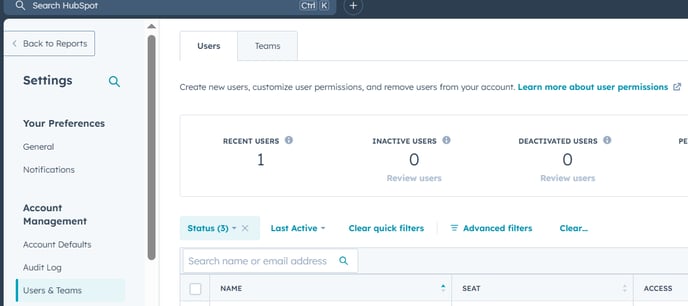
- Select the user having trouble
- Under CRM > Deals, check:
- Edit permissions include deals they need to assign
- Assign permission is turned on (if restricted by ownership or team)
Only users with the right permissions can update deal ownership.
Manually Assign or Reassign the Deal Owner
To assign a deal to someone:
- Open the deal record
- Click the “Deal owner” field
- Search for and select the correct HubSpot user
- Click Save
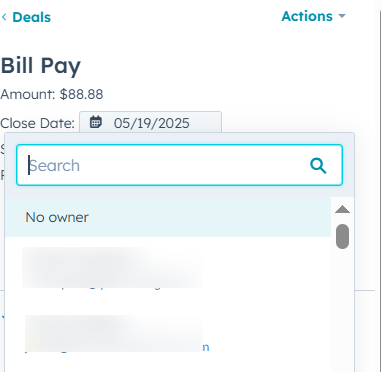
The new owner must be a licensed HubSpot user with access to Deals.
Review Workflow Rules That May Be Changing Ownership
Ownership might be getting reassigned automatically.
To check:
- Go to Automation > Workflows
- Search for workflows that include:
- “Set property value” for Deal owner
- Triggers like form submissions or property updates
- Pause or adjust these workflows if they override ownership unintentionally
Look out for legacy workflows or integrations that might be interfering.
Confirm Sync Settings (for CRM Integrations)
If you're using Salesforce, Outlook, or another CRM tool:
- Go to Settings > Integrations > Connected Apps
- Check for any ownership mapping rules that may conflict
- Make sure deal owners in HubSpot are synced correctly with external systems
Misconfigured sync rules can reset ownership after each sync.
Use Team-Based Ownership if Needed
If you work in teams and multiple users need access:
- Assign the deal to a team owner using the “Deal team” property
- Ensure team members have permission to view or edit team-owned deals
Helpful for round-robin sales teams or shared pipeline management.
Still Need Help?
If you’re still facing deal ownership issues:
- Verify the user has a paid Sales Hub seat if needed
- Check the full history of the “Deal owner” property in the deal’s record
- Contact HubSpot Support with:
- The affected deal ID or name
- Screenshot or screen recording of the issue
- Workflow or integration details (if relevant)