
Common Symptoms
-
You drag a deal to a new stage, but it snaps back
-
You click "Save" after changing the stage, but it doesn’t update
-
Required fields block the stage change but don't clearly say why
-
Automations or workflows reset the stage
-
Users can't move deals due to restricted permissions
Step-by-Step Troubleshooting Guide
Check User Permissions
If you or another user can't move a deal:
-
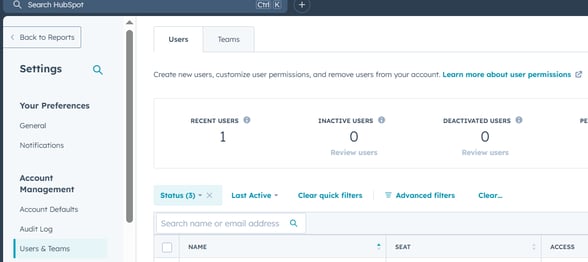
Go to Settings > Users & Teams
-
Select the user having trouble
-
Under CRM > Deals, check if they have:
-
Edit access to "owned only" or "everything"
-
Pipeline permissions for the affected pipeline
-
If they don’t have the right permissions, they won’t be able to update the deal stage.
Review Required Properties for the New Stage
Each pipeline stage can have required properties that must be filled before a deal can move forward.
To check:
-
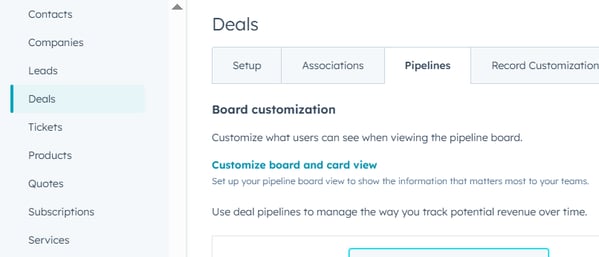
Go to Settings > Objects > Deals > Pipelines
-
Choose the affected pipeline
-
Click “Edit” next to the stage that isn’t accepting the move
-
See if any required fields are listed
If required fields are missing, HubSpot will block the move until they’re filled.
Tip: You can test this by trying to move the deal and checking for a prompt asking for missing details.
Check Workflow Automation
A workflow may be automatically moving the deal back or blocking the update.
To investigate:
-
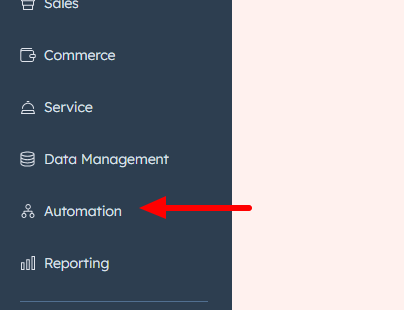
Go to Automation > Workflows
-
Search for workflows that enroll deals or use deal stage as a trigger
-
Check if the workflow includes an action that:
-
Changes the deal stage
-
Reverts deals if certain criteria aren’t met
-
Temporarily turn off the workflow or remove the stage-change action to test if it’s the cause.
Clear Browser or App Glitches
If dragging and dropping deals doesn’t work as expected:
-
Refresh your browser
-
Clear your cache and cookies
-
Try in an incognito window or a different browser
-
If using the mobile app, restart or update the app
Sometimes, local browser issues can cause drag-and-drop glitches that aren't related to HubSpot data.
Confirm You’re in the Correct Pipeline View
If you’re viewing the wrong pipeline or a filtered board view, it might appear like the deal isn’t moving.
-
In the Deals board, confirm the pipeline name at the top matches the one you’re trying to use
-
Check for filters (e.g., “My deals only”) that may hide the deal after it moves
You may need to clear filters or switch pipelines to see the change take effect.
Still Need Help?
If you still can't move deals between stages:
-
Check user role and permissions
-
Look for any integrations that may be interfering
-
Contact HubSpot Support with:
-
The deal name
-
Pipeline name
-
Screenshots or screen recordings of the issue
-