
Common Scenarios
- Filters return no results, even when records exist.
- Filter results are incomplete or inconsistent.
- Custom property filters aren’t working as expected.
- Date-based filters show unexpected behavior.
Step-by-Step Troubleshooting Guide
Double-Check Filter Criteria
Start by reviewing the filter settings:
- Confirm you're filtering on the correct object (e.g., contact vs. company).
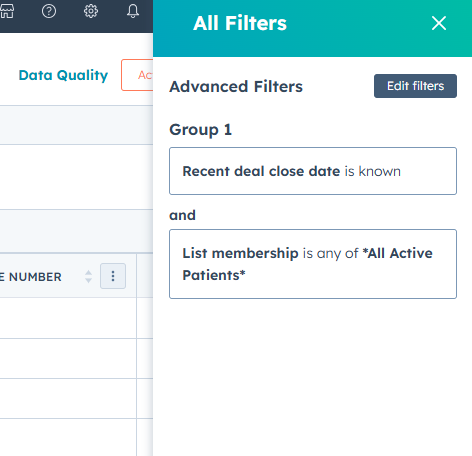
- Ensure the property name and value format match what’s in your records.
- Avoid using multiple filters with conflicting logic.
Example: Filtering for "Lifecycle Stage is Customer" and "Lifecycle Stage is Lead" will return no results — a record can't have both values.
Use "OR" Logic if Needed
By default, filters use "AND" logic, meaning all conditions must be true.
If you're trying to match either of two values, click "Add filter group" to apply OR logic.
Check Property Data Formatting
Filtering won't work if the property values are stored incorrectly.
- For dropdowns or multi-select fields, confirm you're using exactly matching options.
- For date fields, ensure values are stored as valid date formats.
- For number fields, avoid leading zeros or text-based entries.
Tip: Go to a sample record and inspect the property to see how it’s stored.
Test Filter on a Known Record
- To confirm a filter should match, use this quick test:
- Open a record that should match the filter.
- Copy its unique property value.
- Apply a filter using just that one value.
- If it still doesn’t show up, the problem likely lies in formatting or field type.
Understand Filter Limits (Lists vs. Views)
HubSpot filtering behaves differently in Lists vs. Views:
| Feature | Views | Lists |
|---|---|---|
| Real-time filtering | ✅ Yes | ✅ Yes |
| Can filter across objects | ❌ No | ✅ Yes (e.g., contacts with deals) |
| Supports advanced logic | ❌ Limited | ✅ Yes |
For more complex filters, try using Active Lists instead of object views.
Filter Ownership & Team Fields
If you’re filtering by:
- Owner
- Team
- Create date
Make sure:
- Ownership is actually assigned in the record.
- You’re using “is known” or “is unknown” appropriately.
Hidden or Archived Properties
Some properties may be hidden from the view or deprecated:
- Go to Settings > Properties, search for the property.
- Confirm the property is active and visible to the relevant object.
- Archived properties won’t be available for filtering.
Clear Cache or Try Incognito
Sometimes, filters fail due to local browser issues.
- Try applying filters in an incognito window.
- Or, clear your browser’s cache and cookies.
- Disable any extensions that might interfere with HubSpot.
Still Not Working?
If filters still don’t behave as expected:
- Document your filter conditions.
- Capture a screenshot of a record that should match.
- Contact HubSpot Support with this info, or submit a support ticket via the Help button in your portal.