Recording Transactions in HubSpot
-
Invoices capture the transaction details.
-
Deals track payments made (named: "Payment – [number]").
Note: If payment is partial, invoice will remain open.
Creating a New Sale
-
Find patient in HubSpot.
-
Under “Invoices” → Click Add → Create Invoice.
-
Enter Invoice Date, Customer Type, Coordinator, and Treatment End Date.
-
Select plan(s) from Product Library → click Add.
-
Modify unit price as needed.
-
Click Finalize twice.
-
Close the email dialog box.
Applying a Payment to an Invoice
-
Hover over invoice and click Preview.
-
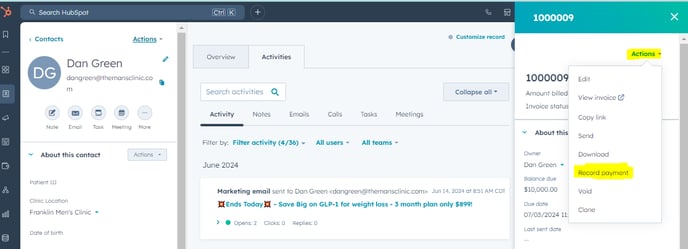
Click Actions → Record Payment.
-
Enter payment amount and source (card, cash, financing).
-
Uncheck email receipt.
-
Click Record Payment.