
Verify Activity Logging Settings
Email Logging:
- Check Email Integration Settings: Ensure your email provider is integrated correctly with HubSpot. Navigate to Settings > Objects > Activities > Email Logging to verify your settings. HubSpot Community
- Enable "Log All Emails to/from Known Contacts": In the same settings menu, select "Log all emails to/from known contacts" to automatically log all email communications with existing contacts. HubSpot Community
SMS and Call Logging:
- Check Integration Settings: If you're using third-party integrations like Aircall or CallRail, ensure they are configured correctly. Aircall Support
Manually Log Activities
If automatic logging fails, you can manually log activities:
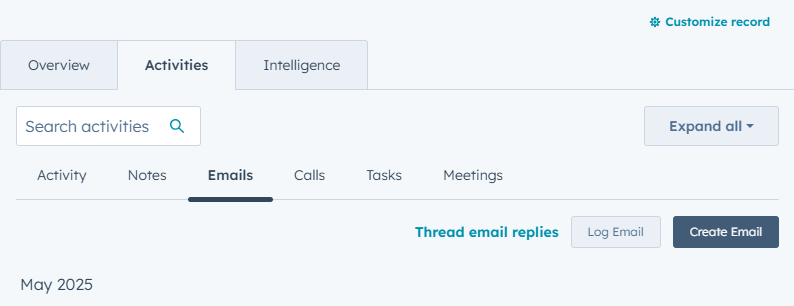
- Navigate to the relevant Contact, Company, Deal, or Ticket record.
- Click on the Activity tab.HubSpot Knowledge Base+3Aircall Support+3Aircall Support+3
- Click the + Log button and select the appropriate activity type (Call, Email, Meeting, SMS).support.webdew.com
- Fill in the details and save.
Check Activity Filters
Ensure that the activity feed filters are set to display all relevant activity types:
- Go to the Activity tab of a record.
- Click on the filter icon and ensure that all activity types (Calls, Emails, SMS, etc.) are selected.
Review User Permissions
Ensure that the HubSpot user account has the necessary permissions to log activities:Aircall Support
- Navigate to Settings > Users & Teams.
- Select the user account and verify that the appropriate permissions are granted.
Check for Conflicting Extensions or VPNs
Certain browser extensions or VPNs can interfere with activity logging:
- Disable Conflicting Extensions: Extensions like AdBlock, Ghostery, or MailTrack can conflict with HubSpot's tracking. HubSpot Knowledge Base
- Disable VPNs: VPNs can block tracking requests. Temporarily disable your VPN and test activity logging again. HubSpot Knowledge Base
Test with a New Activity
To determine if the issue is specific to certain activities:
- Create a new test activity (e.g., send a test email or make a test call).
- Check if the new activity appears in the activity feed.
Still Experiencing Issues?
If the problem persists:
- Contact HubSpot Support: Reach out to HubSpot Support with detailed information about the issue.
- Provide Relevant Details: Include screenshots, affected records, and any troubleshooting steps you've already taken.